You can power on a Mac remotely
Comments
adrianmonk
rzzzt
The power button on the Macintosh IIsi could be turned with a flat-head screwdriver to achieve the same thing you describe (locking it in the permanently-powered state): https://en.wikipedia.org/wiki/Macintosh_IIsi#/media/File:Mac...

geerlingguy
This was a neat hack in many of the early Macs between the 'big switch' ones (like the Mac Plus and SE) and the 'pushbutton' ones (like the Performas and Quadras).
You could even do it with your fingernail; just push in and twist the power button, and it would stay in forever, and the Mac would automatically boot when you plug it in.
Lammy
My Quadra 700 has this too
geerlingguy
Oh nice—and a true classic, that's the one from Jurassic Park, right?
Lammy
Yea verily, although it was a free street find in 2014 and not something I sought out because it was in the movie. Here she is: https://i.ibb.co/1YkhpHzv/Quadra700-Stack.jpg
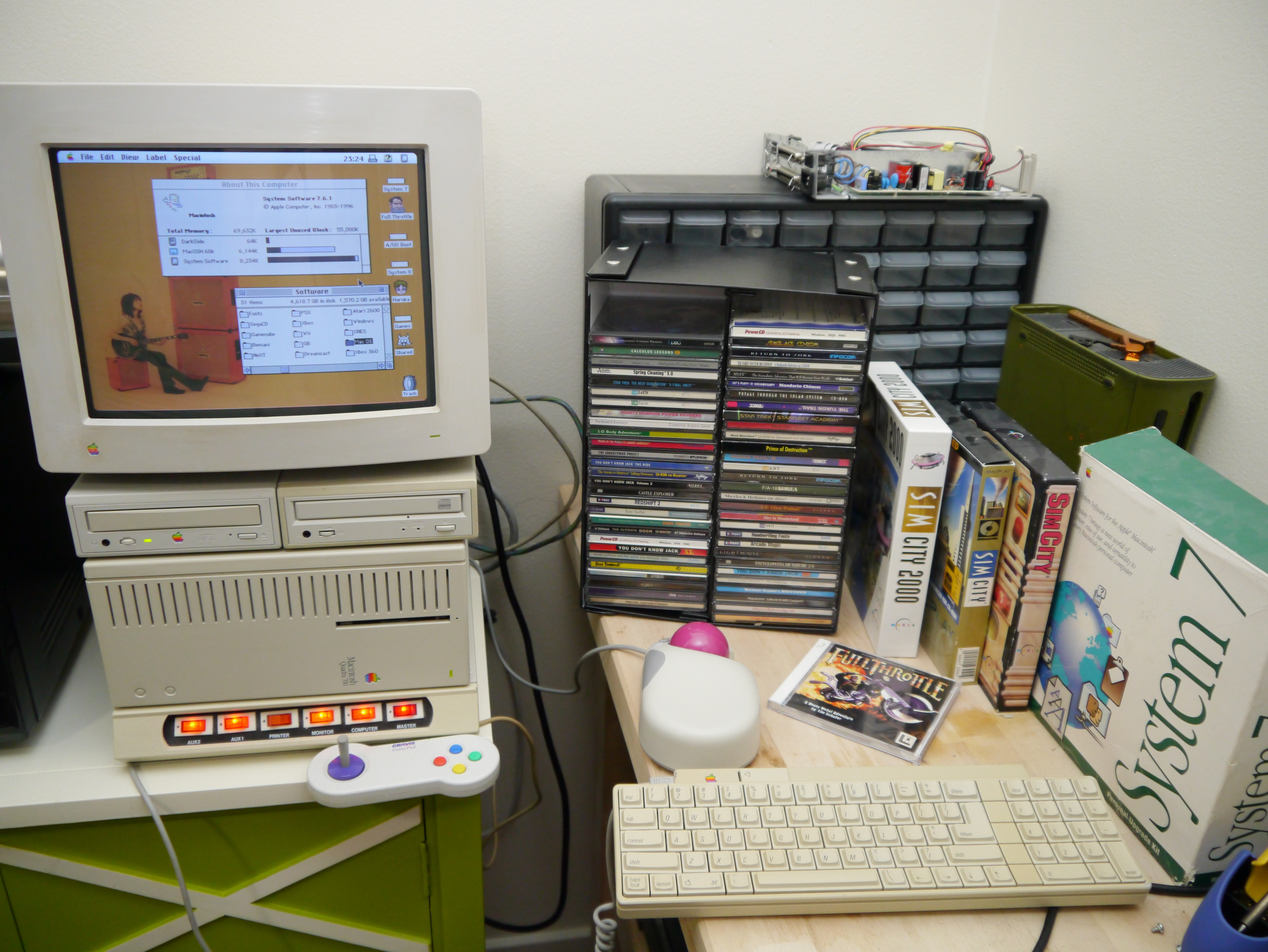
luckman212
Oh man that's nice. When I was in high school slugging along with a Mac LC, I dreamt of having the amazing Quadra 700 with its superior speed and graphics. Crazy that the price was $5,700 ($14K in 2026) and you just picked it out of the trash.
mrpippy
My memory from classic Mac OS is that pushing the keyboard soft-power key brought up a system-modal dialog asking if you wanted to shut down, restart, or cancel, a dialog with exactly the same design as: <http://www.christianboyce.com/page25/files/tipofthedayjulyth...>
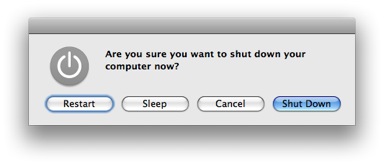
That would obviously not be compatible with a server, maybe if soft power was just constantly held down starting from boot that dialog wouldn't show up?
m463
I remember debugging with macs and lots of engineers had fishing weights with square bottoms to hold down keys.
I didn't have one so made a few stacks of pennies I taped together.
for example shift at boot, cmd+s, etc...
woadwarrior01
Isn't it easier to scotch tape or better yet, duct tape it down?
olelele
Duct tape gets real nasty after a while
geerlingguy
Tape gets weaker, mechanical wedge would stay a bit longer.
thomassmith65
Xserve had LOM hardware 20 years ago.
LOM enables power management even if the Xserve is off, and even if it lacks an installed operating system.
Edit: Xserve was an Apple rack mounted server that ran a special version of Mac OS X
dcrazy
This isn’t quite lights-out, and Xserve ran the same version of Mac OS X Server you could install on any other Mac.
thegagne
How is it not lights-out? You could remotely power on/off the servers (XServe only). Other Macs could not do this, as they did not have the separate LOM network interfaces, etc.
I managed a bunch of XServes for a while, they were incredibly good hardware. The Mac Server software kinda sucked (not the LOM stuff, it was as good as any of the LOM from Dell, which is to say, not amazing, but workable).
dcrazy
Sorry, I was referring to the automatic power-on feature described in the linked article.
geerlingguy
Only on the Xeon models. The G4 and G5 didn't have any kind of LOM :(
thomassmith65
My original comment was to add context to the article's first line:
Apple FINALLY lets you turn on your Mac remotely, without having to press the power button.
geerlingguy
To be fair, the number of users who ever touched an Intel Xserve is infinitesimally small in comparison to other Macs.
thomassmith65
Any implication that OS X Server could only run on Xserve was inadvertent. I mentioned the special OS to preempt discussion of whether Xserve was, strictly speaking, part of the Mac product line.
dcrazy
Xserve is a Mac. In fact the original one’s product code was RackMac1,1.
thomassmith65
Well then, the Mac had LOM hardware 20 years ago.
LeoPanthera
This is an aside, but I really hate clickbait culture. You can find it anywhere, but the YouTube video embedded in that page is a really good example.
The title is: "Apple FINALLY lets you do this!"
The thumbnail shows someone plugging in (or unplugging) the power cable from a Mac Mini.
Neither is relevant to the video. Neither tells you what it's about. I'm sure this kind of clickbait works, because otherwise it wouldn't exist, but I am never going to click on that kind of slop. Never.
threecheese
Unfortunately, any “creator” who wants to be searchable on YouTube needs to optimize for that algorithm. I have the same feelings as you - and it includes pictures of their face pointing to something, with a particular expression of surprise.
I give Jeff a pass though, and make sure I send alternate goodness signals like liking his YT videos after I watch them. He’s one of us.
nom
It's not about being searchable, it simply gets more clicks because of our stupid human brain. That's why there is a surprised face on half of them.
It makes a noticeable financial difference for creators and almost everyone seems to have accepted it.
Unfortunately, I agree.
ssl-3
I give Jeff a pass because he's Jeff, but even Jeff can do better.
For the unknown clickbaits that show up for me on YouTube, I put hard "Don't recommend this channel" feedback into the algorithm.
geerlingguy
I publish the blog posts for the technical audience, and the YouTube videos for a living.
And unfortunately, I and all the other YT creators I've talked to have experienced the same thing: a more technical title will give you half or worse in terms of views. You have to play YouTube's game if you want to have any kind of audience.
I find a ton of channels that are buried not because they don't have great content, but more because they don't 'package' it well.
It's something I learned in my programming career: no matter how much I despise marketing, marketing is necessary. And on YouTube marketing is almost entirely the thumbnail and title.
I always take real pictures, show the exact subject and topic covered in the video, etc. — but I stretch the title a bit because that's an immediate way to get 2x-3x the views (and they're not click-away views, either, it's a large portion of the audience who would simply not click at all otherwise).
ssl-3
How does this 2x-3x increase in views translate to revenue, might you suppose?
LeoPanthera
Have you considered who is clicking on your videos? Is the audience that clicks on "You won't believe!" different to "You can do this"?
Or do you only care about eyeballs, and not who is behind the eyeballs?
geerlingguy
I care about paying for my mortgage, sustaining my work, supporting my family... it's how I make a living.
Again, my blog is made for the more technical audience.
With Google diverting search traffic away, there's about a 1:1,000 ratio of blog visitor to YouTube viewer now.
If you don't like my YT channel, please subscribe to the blog. I write a separate and more detailed blog post for almost every video, and the titles are more technically accurate. (I also post videos on Floatplane with the more accurate titles, for direct channel supporters.)
And I care about all eyeballs, not just technical ones :)
anonomousename
For creators, the click bait titles are non negotiable to capture the masses. If you think you are not the masses and want fewer clickbait titles, use DeArrow to fix it with crowdsourced, non-clickbait titles.
We are heading to a similar state as internet advertisements - they became so obnoxious that the average person installed an adblocker if they cared. DeArrow is next
TopHatHipster
Still a shame macOS doesn't support full Wake-on-LAN. This holds me back from properly repurposing my M1 Mac Mini as a remote development machine or CI/CD agent with turning it on and off via WoL+SSH.
It hurts even more to see the "turn power on whenever power is detected" feature is locked to Mac hardware from 2024 or newer. I don't see a reason why not all Apple Silicon machines can support this feature.
mannyv
Power on after a power failure has been a Mac feature for decades. Did it stop working at some point?
Of course, it didn't work if you set your Mac to shut down if the UPS is running out of power, which was always quite annoying. You want a clean shutdown, but you also want it to come back up. I think I got around this by using shutdown hook scripts to unmount everything then just stop.
geerlingguy
No this is power on after clean shutdown ("Always" is the new option Apple added, in addition to "never" and "after power failure")
CrimsonCape
Correct me if you have more experience, but I have mostly avoided using smart plugs for computers because the PSU capacitors generate a large inrush current which tends to weld the relay contacts over time, causing the plugs to fail prematurely. Maybe ok in a power loss scenario, but not good to use for remote waking regularly...
jaggederest
Modern ones that are rated for it are fine, you might need to replace it after a few years, but they're cheap. Thousands of cycles for a 15 amp device.
bombcar
If you have as many devices as he does and a rack, getting a real APC managed power distribution unit is worth it.
jaggederest
Totally true, I bet you can get one that has a service interface to hook into whatever automation you're using, as well.
m463
I vaguely recall wake on lan actually worked with macs... but when powered on by an airport/airport extreme.
I might be wrong.
dcrazy
You’re thinking of the Bonjour sleep proxy. Normally if you tried to ssh to `mymac.local`, but your Mac was asleep, nothing would respond to the mDNS broadcast for `mymac.local`. If it had been long enough that your local mDNSResponder cache had expired, you’re out of luck.
The AirPort would take over for your Mac and respond to mDNS queries on behalf of its hostname. (I believe it would also repeat the service records.) So your lookup of `mymac.local` would resolve to your Mac’s last IP address, and the AirPort would send the WoL packet to your Mac’s MAC, hopefully in time for your TCP connection to succeed.
duskwuff
Wake-on-LAN works fine, but only wakes the machine from sleep. It won't boot a machine that's fully powered off.
butvacuum
depends on the implementation. which kind of embodies why WoL is so useless.
victorbjorklund
We are of course talking about the Mac implementation
0011010111
[dead]
> Three decades later, with the release of macOS 26.5, Apple caught up: you can finally set your Mac to 'Always' boot whenever power is restored, regardless of how it was shut down.
Back in the 1990s, a Mac sysadmin showed me a clever trick for this.
Get one specific Apple Desktop Bus keyboard that has a soft power key on it, I believe the Apple Extended Keyboard[1]. Then get a Bic pen[2]. Push down the power key on the keyboard, and while it's still down, wedge the pen cap between the key and the keyboard case.
The pen cap is the perfect size and shape to hold the key down, and Bic pens are easy to find. There are no ill effects from having the power key down all the time, and the Mac will boot up after a power failure. So you don't have to drive to work just to push the power button.
This was especially handy considering you sometimes needed to use Macs as servers (file server, printing, certain Mac-only applications, etc.), but Apple did not make servers.
---
[1] https://en.wikipedia.org/wiki/Apple_Extended_Keyboard
[2] https://en.wikipedia.org/wiki/Bic_Cristal