Yserver: A modern X11 server written in Rust
Comments
aleph_minus_one
simonask
On general principle, I think 22 years of inactivity is perfectly reasonable for considering any software project perfectly dead.
goodmythical
On general principle, I think sharing but a single character between names of products is perfectly reasonable for considering any names perfectly seperable.
No one's comparing this to 'y'combinator or 'y'ahoo.
'server' and 'window system' are completely different...
aleph_minus_one
That's why I wrote "existed" (simple past).
Klonoar
The “be aware” is the problematic text; nobody cares that a two decade old dead project has the same name.
aleph_minus_one
People who have been programming for a long time often have very good memories of old projects and software in which they had a lot of hope, but which failed at the end.
Natfan
i feel likt there's likely more programmers who weren't aware of a 20yo (unfortunately) failed project, compared to the amount of programmers who would be aware of this project, if it succeeded
aleph_minus_one
> i feel likt there's likely more programmers who weren't aware of a 20yo (unfortunately) failed project
At that time, what should replace X11 was a heavily discussed topic, so people who were already interested in programming under GNU/Linux at this time typically remember intense discussions on the internet about the pro-s and con-s of lots of proposals to replace X11.
Proposals that I have in mind are:
- Y Window System
- Fresco: https://web.archive.org/web/20100729184325/http://fresco.org...
- Xynth: https://github.com/alperakcan/xynth
- Xfast: https://sourceforge.net/projects/xfast/ (here a German article about Xfast from 2008: https://www.linux-magazin.de/ausgaben/2008/11/ohne-x-tras/ )
- Mir (Ubuntu) as the main competitor to Wayland: https://en.wikipedia.org/wiki/Mir_(software)
- Wayland
- ... and very likely many, many more proposals.
See also https://en.wikipedia.org/w/index.php?title=Windowing_system&...
simmonmt
This is pretty cool - especially that it's at the point where it can be used with a real window manager.
I'm curious why multiple screens is considered legacy baggage and thus out of scope, given how common multiple monitor setups are these days. I also have zero familiarity with X internals, so don't know if multiple monitor support is a horror show that'd be miserable to support.
somat
I suspect(with out reading the source to find out) that screens are the traditional X11 screens as opposed to the modern xrandr combined screen.
Traditionally each screen in an X11 setup was it's own separate thing with it's own separate frame buffer. While technically applications could move between screens, this depended on the application caring enough to do so. It had to maintain two(or more) mirrored windows(one per screen) and keep them all aligned. So realistically no application did this.
The modern method of doing multi monitors on X11 involves one large virtual screen with each monitor assigned a section of it. This has downsides, for example; this is where the myth that X11 can't do mixed DPI setups comes from. But it has one huge massive overwhelming upside. The application does not have to be aware that there are multiple screens and multi monitor setups just work.
skeledrew
Just did a quick `xrand -q` to confirm I'm doing multiple DPIs, etc (cuz laptop and external monitor) on a single screen with 0 issues. Unless the physical misalignment of the monitors, which reflects as a vertical jump when moving the mouse pointer across the virtual boundary, can be considered an issue.
Liskni_si
> So realistically no application did this.
Old versions of GIMP (back when the toolbars etc. were separate windows) used to let you move any of its windows to a different X screen. And by "move" I don't mean drag - there was a menu where you could select the screen to move to.
simoncion
I really miss the tear-off-into-their-own-window menus. They were so handy.
I have to wonder if the fact that Wayland either never had or has only very recently gotten support for applications that need to place their windows at application-commanded locations on the screen meant that those lovely tear-off menus had to die.
obezyian
The gtk3 docs give the following reason for the deprecation:
Menus are not meant to be torn around.
Yeah, they are meant to be implemented with web technologies and look like shit.
BTW, this tear-off style is probably quite old. Long ago, I used an early version of ANSYS (for Windows) which apparently was still close to its Unix original, and it had its menus pop up like real windows, with close buttons! They were nicely cascaded, but one could rearrange them.
simoncion
> BTW, this tear-off style is probably quite old.
Yeah, I agree with that. I was using some ancient X11 program that had tear-off menus, but I'll be fucked if I can remember which one it is.
> Yeah, they are meant to be implemented with web technologies and look like shit.
Yuuuuuup. If you always take the "yes" side, you'll come out quite a bit ahead of your fellow gamblers for the "Will GNOME make things worse for sophisticated users and call it 'simplicity'?" wager.
simonask
FWIW, they have been unfashionable for much longer than Wayland has been usable, on all platforms.
And that’s understandable. It’s not actually good usability.
simoncion
> It’s not actually good usability.
They're really great on systems that let you hold a modifier key and then a mouse button to drag windows around... rather than requiring you to find the very-small-compared-to-the-size-of-the-entire-window portion of the window you can click to change the window position. They get even better when you're on a system that reliably remembers the position of application windows.
Folks who have never used a system that lets you relocate and resize windows without first moving your mouse cursor to "blessed" regions of the window absolutely do not know what they're missing.
> ...they have been unfashionable...
Fashion is for people who love doing busywork. Where fashion gets nasty is when that busywork makes a bunch of work for everyone else.
winrid
The downside is your refresh rate is locked to the slowest monitor.
simoncion
This report doesn't agree with what I tested just now.
Using the xrandr CLI to set the refresh rate to 24.0 on my primary monitor and 60.0 on my secondary results in "cinematic" visuals on the primary monitor and normal "soap opera" visuals on the secondary. Setting the refresh rate back to 60 on my primary results in "soap opera" visuals on both.
I'm currently using Windowmaker, but I see no reason why this wouldn't work with KDE. I'm using xorg-server 21.1.23 (which supports RandR 1.6), xf86-video-amdgpu 25.0.0, xrandr CLI version 1.5.4, and kernel 7.0.12.
I'm on Gentoo Linux. I would not be surprised to learn that Debian (and Debian-derived distros) never shipped a version of Xorg or the related libraries where this worked correctly.
winrid
It's possible it has been fixed in the last couple years but for a while it was the case.
simoncion
Were you -perhaps- using GNOME and the GNOME-provided GUIs to change monitor refresh rate? Given GNOME's history of legendarily user-hostile decisions made in the name of "simplicity", it would surprise me not even a little bit that the GNOME folks decided to pretend that the active monitor with the lowest refresh rate dictated the fastest you could drive any monitor.
michaelmrose
This is basically a built in limit of X. The only exception is that monitors that support variable refresh rates may be able to offer this feature in multiple monitor configuration subject to software and hardware options.
I'm personally very dubious of the claim. This has basically never been supported because x treats all screens as one big screen unless you run multiple X screens which disallows moving Windows between screens which is a pretty big barrier to normal usage
simoncion
> This has basically never been supported because x treats all screens as one big screen unless you run multiple X screens which disallows moving Windows between screens which is a pretty big barrier to normal usage
Hmm.
I'm not sure what windowing system you've been using over the past ~thirty years, but you seem to be unaware of both Xinerama (released in the late 1990s) and XRandR (version 1.2 [0] of which was released in like 2006). Maybe you've been using an X11 implementation provided by some proprietary *NIX for all of these years, but whatever you've been using, it has certainly been neither XFree86 or xorg.
> The only exception is that monitors that support variable refresh rates may be able to offer this feature in multiple monitor configuration subject to software and hardware options.
1) Monitors have been able to support multiple refresh rates for ages. This is a big part of why EDID and friends exists.
2) I note that VESA standardized Adaptive Sync in ~2009, and that VRR-supporting monitors were extremely uncommon in the consumer space until the introduction of GSync and the addition of Adaptive Sync to the DisplayPort standard... which both happened in ~2014. Add to that the fact that my secondary monitor does not support VRR, and it becomes very clear that VRR is not a prereq for driving multiple monitors at different refresh rates.
[0] IIRC, 1.2 is the version that gave it feature parity with Xinerama
LargoLasskhyfv
> unless you run multiple X screens which disallows moving Windows between screens which is a pretty big barrier to normal usage.
Is it? Or is it forgotten?
Around 1994 I had a Pentium 133 with 16MB. In it a Diamond Speedstar 24(Pro?) (Tseng ET 4k) Vesa Local Bus, some ISA Trident 8900, and an ISA Hercules, driving one 17", one 15", and the Hercules at something like 12" IIRC. One could choose in the BIOS which "GPU" ...err... frame buffer should have priority at boot, or rather which slot, so when you've chosen VLB it took that, and the others were a matter of the OS to initalize and drive way after boot.
At the time I compared 386BSD, NetBSD, SLS(Softlanding Systems), early Slackware and SuSE, and lo and behold, I could move windows across all of them on all of them!1!!
With proudly created custom modelines for all of them, even the Hercules, with different Hz & DPI for each screen.
Though it didn't really make sense, because X on the Hercules was very laggy and jerky, coz' 8-Bit ISA. Was more useful for syslogs and debugger.
Anyways, it worked, even if only as POC, to show off.
Now that wasn't Xorg, but XFree86, but still?
1994. Worky, worky!
IIRC that also applied to Accelerated-X, at least for the Tseng and Trident.
Didn't try the Hercules with X then.
michaelmrose
In 1994 the only way to have multiple monitors was to run X with multiple X screens which did not allow moving windows freely between screens. In 1998 X11R6.4 brought xinerama and proper multi-head with many physical screens but only 1 X screen removing that complication.
May I submit that it is more likely that you are speaking of 1998 instead of 94 rather than this entire technology working differently.
LargoLasskhyfv
> May I submit(suggest?) that it is more likely that you are speaking of 1998 instead of 94
No. I'm not pulling this out of thin air, or misremembering. It wasn't easy, and it wasn't in the manpages, or only some of it. It was rather involved, and didn't work on first try. Not only that X-thing, but also which TTY/VT was on which head for tailing syslogs, std-error, and whatnot else. But it worked. And with no X on the Hercules, just between the Trident and Tseng, even reasonably fast.
I remember exactly because I moved shortly after that. I also remember which relief Xinerama brought me, when it appeared :-)
Edit: I also remember frying the Hercules and the attached screen with both of them giving me the magic blue smoke, because I've overdriven them a little. But it didn't matter, because that was already abandoned cybertrash at the time, used, and collected just for fun :-)
simoncion
> With proudly created custom modelines for all of them...
Yep. I remember that pride very clearly. I'm also so glad I never have to do that math ever again.
> SLS(Softlanding Systems)
I'd never heard of this one. If the claim that its slogan was "Gentle Touchdowns for DOS Bailouts" is true, then that's a really great pairing of distro name and slogan.
LargoLasskhyfv
Come on...
Isn't that fun? https://nyanpasu64.gitlab.io/blog/crt-modeline-cvt-interlaci... :-)
TBH I've been mostly unimpressed with the early Linuxen. At the time they had almost nothing which NetBSD didn't have, and I knew that really well. Gentoo 'ricing' well.
But it was clear that there was momentum behind the Linux hype. It was on CD-Roms in magazines, in book stores. While *BSD wasn't known generally, just by some guys in Universities, or similar. Bad marketing. FUD because lawsuits, and whatnot else.
Such BSD, so sad...
porridgeraisin
Here:
amdgpu + x11 + xfwm4
  $ xrandr | grep -A1 ' connected' | sed 's/^/  /'
  eDP connected 1920x1200+0+240 (normal left inverted right x axis y axis) 286mm x 178mm
     1920x1200     60.03*+  40.02
  --
  DisplayPort-0 connected primary 2560x1440+1920+0 (normal left inverted right x axis y axis) 597mm x 336mm
     2560x1440     59.95 + 200.00*  179.96   144.01   120.00
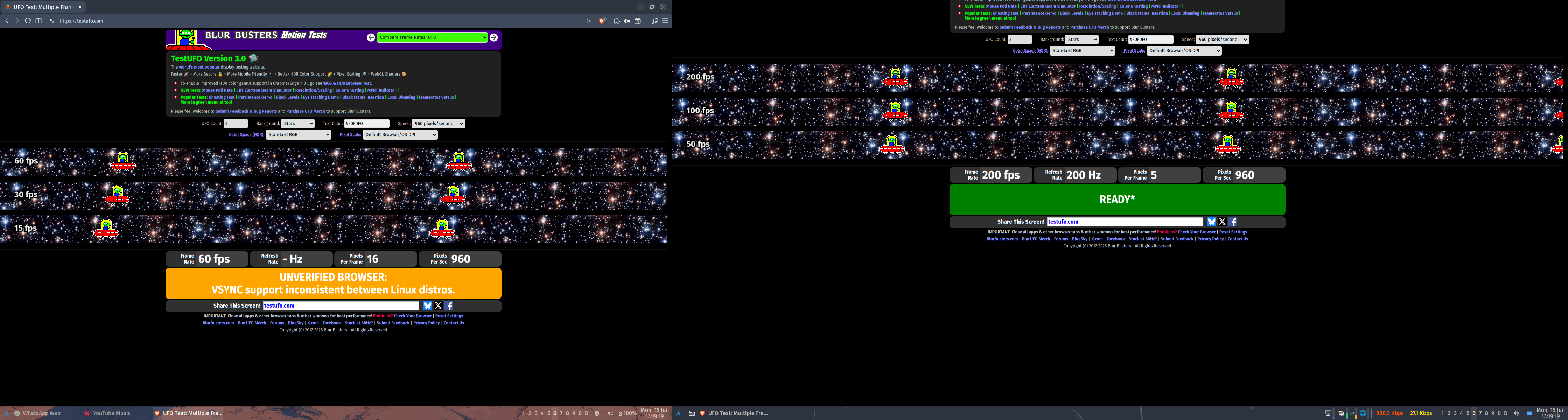
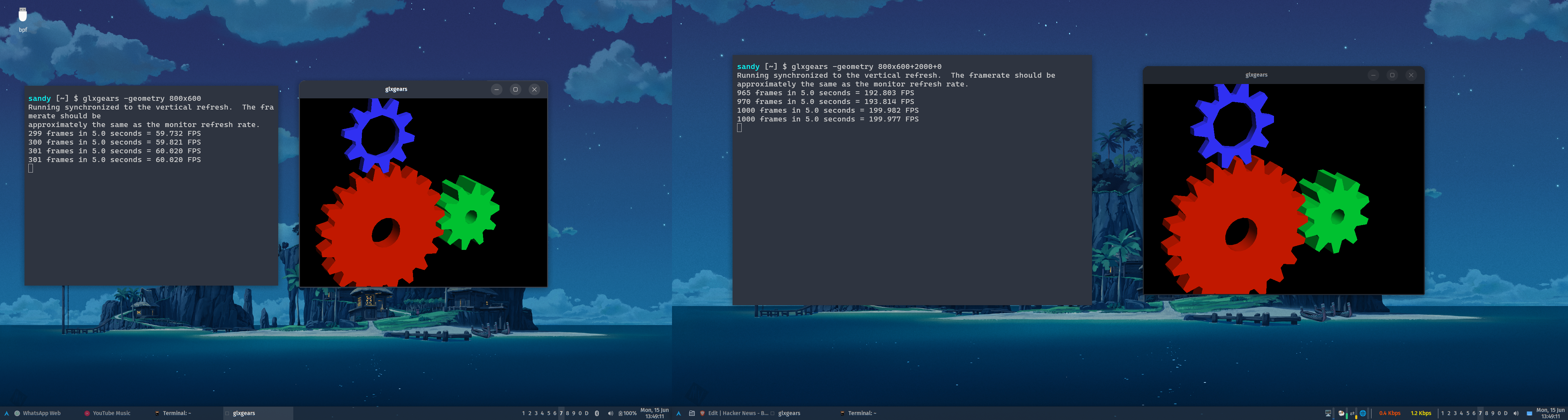
porridgeraisin
Not true, see my comment a little deeper down this thread
ltrever
Can you pls share smt on how to properly do multi dpi in X? It is hard to find and I struggle with it
ndiddy
The mixed DPI support on X11 is just that each monitor provides a DPI attribute that applications can query. It's up to the application or the toolkit it uses to actually look at this attribute and scale itself properly. In practice, this means that only Qt software will have DPI awareness on multi-monitor setups, and it requires having the "QT_AUTO_SCREEN_SCALE_FACTOR=1" environment variable set for applications that don't explicitly opt into it.
What most X11 users actually do is set the global DPI to that of the highest DPI monitor, and use xrandr to scale down the framebuffer of the lower DPI monitor, which "zooms it out". Note that this has performance and image quality implications. There's a guide on how to do this here: https://blog.summercat.com/configuring-mixed-dpi-monitors-wi...
somat
The irony is that despite the myth to the contrary wayland does not even try to handle mixed DPI at all and only fakes it via the fractional scale hack and X11 has supported mixed DPI from probably day one.
Admittedly X11 mixed DPI was using separate screens which were awkward to deal with and early versions of the unified screen tech (xinarama and xrandr) did not support mixed DPI. And even modern X11 while it provides the needed DPI information requires the application to care enough to support it. Which really means unless the toolkit provides it for free most applications are not going to do anything,
ndiddy
> The irony is that despite the myth to the contrary wayland does not even try to handle mixed DPI at all and only fakes it via the fractional scale hack and X11 has supported mixed DPI from probably day one.
I'm not sure what you're talking about, fractional scaling is just another way to describe DPI. The scale factor is just the DPI divided by 96. If you're referring to windows getting scaled by the compositor for fractional scales, that's only used for older software. Both Qt 6 and GTK 4 support natively rendering window contents at fractional scales on Wayland.
somat
In a fractional scaling setup you first create a homogeneous virtual screen at the dpi wanted then get the right size by scaling the monitors out to fit. A dpi aware application will draw itself at the correct size on the appropriate screen. The main difference is the dpi aware application still looks good on all monitors. where as the fractional scaled stuff suffers scaling artifacts.
Wayland only supports fractional scaling. and there is a good argument that this is a better system, not because it looks better, it does not. but because applications don't have to be aware of it where a mixed dpi requires the application to actively deal with it.
Gigachad
This + mixed refresh rate are the key selling points of Wayland.
arcfour
I agree it used to be fiddly at best but in recent years I had found it to be pretty easy in X11.
I haven't had complaints there for Wayland but I will say that it breaking other things has been annoying.
simoncion
Xorg does per-monitor DPI and per-monitor refresh rate. Debian probably never shipped a version that does, but it works fine on Gentoo Linux.
I've tested per-monitor DPI before, and [0] mentions one way to do it. I tested per-monitor refresh just now. Using the xrandr CLI to set the refresh rate to 24.0 on my primary monitor and 60.0 on my secondary results in "cinematic" visuals on the primary monitor and "soap opera" visuals on the secondary.
I'm currently using Windowmaker, but I see no reason why this wouldn't work with KDE.
Gigachad
Maybe it's possible now. It wasn't back when I last used X. Now that Wayland is the default on most distros and works on nvidia now I don't see any reason to go back.
simoncion
Good for you? But mixed-monitor DPI and mixed-monitor refresh rate haven't been key selling points of Wayland for like eight to ten years, at least.
It has been nearly eighteen years since the Wayland project started, and they are still not at feature parity with the major windowing systems. [0] It's nuts how long it's taking them. [1]
[0] As one example, apparently the Wayland policy for clients that stop responding for a few seconds and fill up their event mailbox is still to terminate the stuck client. If memory serves, Windows 9x handled stuck clients better than that.
[1] I'm sure it's good enough for what you're doing and you never run into any rough edges or misfeatures, so don't bother chipping in with that retort. ;)
AngryPhoenix
[dead]
chadgpt3
X screens are legacy. It used to be you could connect to a particular screen by number to open windows on that screen but the modern way to do it is to have one big virtual screen. X screens were like having a separate X server for each monitor, but with a single shared cursor and shared VRAM. You can see why that's an obsolete model.
rixed
Please do not see any malice in this naive question, but why is that an obsolete model? Back in the days I had very different displays that I could use to display various windows of a flight simulator (some dedicated to some instruments, the big one for the front view, for instance) and it was quite nice. It sounds like that would not be easy to replicate with a single shared frame buffer, but maybe I'm wrong (I've been using nothing but a small laptop screen for decades)
chadgpt3
It's much easier to place a window at a specific position on a large frame buffer than to drag a window between screens when they are separate display servers.
simmonmt
Yep. When did virtual screens come in? My last full time experience with X was with Xsun in the early 2000s under Solaris. There was a shared cursor, I thought you could drag windows between monitors, but I also thought the DISPLAY variable was different for each (though I could be misremembering)
Liskni_si
2007 is when xrandr 1.2 came and made it feasible to use on a laptop - enable/disable outputs dynamically without restarting X.
Xinerama (the extension that enables one virtual screen over multiple outputs) existed before but the layout could only be defined statically - so you'd need to restart your X server with a different config if you wanted to connect a monitor or a projector or something.
rwmj
$DISPLAY is definitely different for each X11 screen, ie. :0.0 for the first screen, :0.1 for the second and so on. (:1, :2 is used for more instances of the X11 server).
I can't recall any application able to use multiple X11 screens (except in the trivial sense that you could set DISPLAY when starting the application), and I've been using X11 since X11R4.
kwhat4
Probably because Xinerama[1] and then later RandR[2] were an afterthought.
[1] https://en.wikipedia.org/wiki/Xinerama [2] https://xorg.freedesktop.org/archive/X11R7.5/doc/man/man1/xr...
Venn1
I compiled it on Debian 13 and it works with XFCE4. Granted, things are a bit squirrely until you disable the compositor. No luck getting it to play nicely with LightDM so I ended up launching it from a TTY. This was on an AMD mini PC I had lying around the studio.
le-mark
I really wish people gave a damn about the “gui over the network” problem x11 solves. Wayland drops this use case entirely so we’re pretty much universally stuck with vnc. Microsoft rdp is a great solution for this in windows land.
nananana9
They drop this use-case, but still use sockets for IPC, so I still have to pretend I'm doing network programming, serialize my messages over the "network" and "flush the stream" (insanity) but don't actually get any of the benefits of this model.
I genuinely wonder if they stopped to think why X11 has sockets or just blindly copied it over. Or are they unaware other forms of IPC exist, that don't require you to go through the kernel 13 times to send a byte to the other process?
mort96
What would you rather they use to communicate with the server? Message passing via shared memory?
UNIX sockets are perfectly fine for IPC with small amounts of data, and is how everything in UNIX has always done it, network transparency or not. They provide a simple, efficient and reliable communication channel between two processes.
p-o
Wayland uses UNIX socket for message passing, but then offload most of the work to shared memory when the real work begins (GPU rendering). I just wanted to add some nuances that it's not as black and white as this comment made it seem.
mort96
Yeah, that’s correct; I implied it by only talking about sending small messages but it’s worth stating explicitly.
Findecanor
How about making the standard client library's API the interface, and have it hide whatever the system is actually using?
A long time ago when I looked at designing a X11 replacement, that was my approach. AFAIK, only special X utilities used anything but Xlib anyway. And later I think this is what early revisions of Canonical's Mir did.
mort96
So .. still using sockets, but not documenting how the messages on the socket look? Why?
mjmas
It also allows implementing a different display interface. For example Haiku OS has a compatibility layer: https://discuss.haiku-os.org/t/xlibe-an-xlib-x11-compatibili...
to11mtm
If I had to guess, because then at least -hypothetically- easier to optimize for the 'local' case (depending on implementation, at least from my understanding of the POSIX/*nix paradigm, bending and breaking a bunch of rules possibly) by dropping in a different implementation.
mort96
Optimise how? There already is only the local case in Wayland, pixel data is shared using shared memory which only works locally. Only small communication messages are sent via the socket. And the Wayland protocol also uses native endianness because, again, it only cares about the local case. It even sends file descriptors over the socket.
So what would you do differently in an alternative client library?
to11mtm
> So what would you do differently in an alternative client library?
I should have better disclaimed my comment.... to be clear I don't know much about the graphics subject, I probably should have prefaced it with,
"I don't know anything about Wayland but as someone totally naieve on the subject but assuming someone else's assumption".
At least to me, even if it breaks the X11 model (Which is a shame, that was fun to play with back in the day) if they're doing it the way they are I'm guessing Chesterton's fence will come into play at one point or another.
dmytrish
That's what wayland-client does.
nananana9
Yes, command buffers over shared memory are the correct way to do this.
  1. You don't need to convert your discrete messages into a stream with size metadata, only for them to immediately be converted to a message on the other side.
  2. You don't need to jump into the kernel to copy over 20 bytes, only for the other side to jump into the kernel to copy it back.
  3. You don't need to deal with the "oh but what if my read returns half a message because this is a stream"
  4. You don't need to pretend you're doing network programming.
It's pretty representative of the project though - "We're doing things the way we've always done them, but slightly different. Now rewrite all your software to work with our thing. No, you cannot do global keyboard shortcuts or set window position. You don't like it? We're doing this for free, you cannot critique it."
mort96
You don’t have to hit the kernel for 20 bytes. Buffer up all your commands and send them to the kernel with a single write(). The other side can then read them all (or however many fit in its receive buffer) with a single read(). The only real difference is that the memcpy happens in the kernel instead of the receiver and that the kernel provides a useful blocking mechanism by default so you don’t have to manage that in userspace code.
You need some kind of serialisation either way. It can be as simple as “this message has the shape of this C struct”, but that’s the case whether you’re talking shared memory command buffers or sending data over a socket (and there are good arguments for and against in both cases).
You’re right that you don’t need to deal with “oh I received half a message” when using shared memory command buffers, but that’s more a code complexity thing someone solves once in wayland-client and then nobody has to really think about it again. It’s not really a performance concern (because hopefully the rx buffer is large enough for it to happen rarely) or application code complexity concern.
nananana9
Sure. But imagine some piece of exotic hardware, e.g. computer mouse, that reports its movement at 1000Hz.
If the compositor wants to notify the client as soon as possible, it has to send 1000 messages per second. If you buffer them, you're wasting the hardware's potential, if you don't buffer, them you're doing 1000 write()s per second, which is... ugh.
If you're literally going to design the protocol from scratch and require all existing software to deal with it, why not pick the IPC model that doesn't have this issue.
mort96
Wait how do you solve that with shared memory command buffers? Don’t you need to involve the kernel to notify the receiver that you’ve written stuff to the command buffer?
Or would the receiver spin in a tight loop on a memory load from some byte in shared memory which indicates a new buffer is submitted, so that it gets notified without involving the kernel? Or is there some fancy mechanism I’m not aware of?
nananana9
You most likely already have a tight loop lying around - the compositor needs to composite the screen each frame, you can probably poll in there. The client likely has one too, if not, you can involve the kernel & scheduler. If you need super high precision you probably busy wait, I don't know what the Linux scheduler's resolution is.
I would probably expose a poll() and let the client deal with it, I don't know if there's a one-size-fits-all signaling mechanism. But you have control over it, which is probably another plus.
mort96
Those loops aren’t tight, they sleep for like 10-16ms for live windows or much longer for background windows. You were talking about receiving updates at 1000Hz.
simonask
Just to let you know, 1000 messages per second over a UNIX socket between two processes is very much well within the capabilities of any recent machine running, say, Linux. That’s not many at all.
simoncion
> But imagine some piece of exotic hardware, e.g. computer mouse, that reports its movement at 1000Hz.
Speaking of... it looks like common Wayland compositors [0] still kill clients that can't keep up with "high speed" event generators like 1kHz mice. [1] So, that's nice.
(For people who plan to retort with "just handle events in a timely manner", check out the comment here [2]. OSX, Windows, and X11 all cope just fine with programs that go unresponsive for multiple seconds. If the statements in this bug report (and the reports I've read elsewhere) are accurate, Wayland doesn't... and that is inexcusable.)
[0] ...or whatever the Wayland terminology is for the thing that does the work of the X11 compositor + window manager...
[1] <https://gitlab.freedesktop.org/wayland/wayland/-/work_items/...>
[2] <https://gitlab.freedesktop.org/wayland/wayland/-/work_items/...>
mike_hock
> command buffers over shared memory are the correct way to do this
Sounds like a security nightmare.
asdfaoeu
You would have a lot of security issues right? Whether or not it's useful Wayland does prevent to isolate clients from each other.
mort96
They’re right on this one, shared memory isn’t some scary dangerous thing. Both processes will just have some region of their respective virtual address space which are mapped to the same physical memory, which they can use to share data. Wayland already uses this for pixel data.
nananana9
Not really, you can have one command buffer per client or process, and map each one in the virtual space of the process that's supposed to write to it.
mike_hock
A fundamental part of the Wayland protocol is passing file descriptors through the sockets so this doesn't generalize to network sockets. It also can't be done with shared memory.
wmf
Waypipe exists. Somebody needs to do the integration so you can run ssh -W though.
LeFantome
Why? Isn’t “waypipe ssh” more “the UNIX” way.
There is also wors.
to11mtm
> Microsoft rdp is a great solution for this in windows land.
The people who put together TS/RDP are geniuses IMO, it's insane as to how usable it has been for at least 15-ish years...
dannymi
waypipe works very fine.
waypipe ssh XXXndiddy
If you're fine with RDP, both KDE and GNOME have built-in RDP support on Wayland. If you want something closer to ssh -X, look up waypipe.
sthuck
I might be mistaken, but both need a physical monitor turned on. If your monitor goes to sleep you can't connect/see a black screen.
The kde one doesn't support remote user login, and while the gnome one does on paper, I never got it to work. The remote connection situation in Wayland is a major regression.
ndiddy
Yeah that's fair, the KDE people have remote login as a goal but it's not there yet. Waypipe is definitely the more mature option at the moment if you need a headless workflow.
Induane
Arcan has a decent model for this.
LeFantome
You can do GUI over the network in multiple ways with Wayland.
TiredOfLife
Sunshine/Moonlight.
TacticalCoder
> I really wish people gave a damn about the “gui over the network” problem x11 solves.
Security-wise there are concerns but...
Early dial-up Internet days (early for me), 28.8k modem, I was already running Linux, probably on a 486. I also had a very old PC laptop (I think a friend of my parents gifted it to me after he got a new one from work), a 386 I think (with the horrible slow display/refresh rate: a TFT IIRC). I used a parallel cable and PLIP (Parallel Line IP) and X11 networking to send a window manager+browser from the desktop (the 486) to the laptop.
So my brother and I could both go on the Internet at the same time.
It felt like the future and, honestly, we've kinda seriously regressed when it comes to "GUI over the network".
simonask
Your story here also illustrates why GUI over the network used to be a much more important use case than it currently is.
These days it’s unbelievably niche, as opposed to more controlled screen sharing scenarios. I think it’s understandable that it doesn’t get a high priority.
skeledrew
> dropping legacy baggage (multiple screens[...]
Looked nice, but crossed it off as soon as I saw that, as I'm working on a project currently that uses many screens. Can't just call a thing legacy because you and the people you directly know aren't using it.
rmu09
Maybe they mean X11-screens. That are more or less independent screens, you can't move a window from one to the other for example.Emacs supports that somewhat with the "open new frame on display server" menu option, but usually, multiple screens are not very useful.
Nowadays, multiple monitors present one big virtual framebuffer and only one logical X11 screen.
freehorse
It is a niche feature, but it is still used eg when an application wants to have good control over a screen's frame buffer to display sth in an external monitor and minimise disturbances. I think it is fairly standard in psychophysics experiments, at least with some software. That's where I worked with such a ("zaphodsheads") setup.
arcfour
They are also roughly analogous to the modern DE concept of "Workspaces" which people seem to enjoy.
wtallis
I think X11 terminology may be causing some confusion. Refer to https://nouveau.freedesktop.org/MultiMonitorDesktop.html
The normal, usable way to have multiple monitors for your X11 desktop environment is for them to all be combined into one logical screen that you can move windows around in, and that applications aware of the right extensions can discover the actual physical layout of the monitors that comprise the single logical screen. Multiple screens in that X11 sense is a far more obscure feature than simply supporting more than one physical monitor.
skeledrew
Ah yes I see it was a terminology issue. I was also confusing it with virtual displays, which is what I'm using a lot of. Thanks.
dormento
Unless I'm mistaken, they probably don't mean xrandr, which is what you probably use. They meant legacy x multi head setup (same session but independent screens). I know its there, but i never used it.
edit: AND i've been using GNU/Linux and derivatives for the last 20 years.
PunchyHamster
X11 "screen" you normally work on is a single virtual one that stretches multiple monitors
What they are talking about is supporting more than one of those, and from app's perspective they are completely separate (can't move windows between them).
While I can see the use cases (say secondary screen only running single app) I never actually used that feature so it's understandable drop.
LeFantome
It is kind of ironic that all the would be X successors waiting until Wayland took over before appearing.
Something like XLibre or Phoenix would have been taken very seriously 5 years ago.
Ferret7446
I think it was only recently that Xorg started dying and Wayland became mostly usable for most people. That was when I switched over, and I assume a lot of others as well.
vidarh
Love seeing this. I'd be interested in seeing how much more could be shaved off by doing things like offering an xcb/xlib shim that moves more functionality to the client side (e.g. server-side font support are trivial to move client-side) as a means to deprecate features on the server side that most modern X11 apps don't use anyway.
sunshine-o
The wayland.fyi people might have a point on the whole X11 vs Wayland thing [0].
At least it is worth reading.
- [0] https://wayland.fyi/
LargoLasskhyfv
Seems informative, but I hate what they are doing with the mouse pointer.
kennywinker
Projects like this really need to disclose how much ai was used. Otherwise my default assumption is it’s slop, which would be a bummer if someone carefully crafted this with some light ai assistance.
hokkos
Seems pretty accurately disclosed to me https://github.com/joske/yserver/graphs/contributors
asveikau
I was under the impression that this person is pretty heavily dependent on Claude.
And for example, it's a weird signal to me when somebody believes the reason X11 has baggage is because it does byte swapping for endianness. This statement alone taints the entire rationale for the project.
cute_boi
Checked and as with many project in HN, this is very slop..I am sure author haven't even reveiwed more than 20% of the code.
phendrenad2
I agree, as soon as people start proudly tagging their vibe-coded projects, the sooner people will stop judging AI projects as "slop" based on nothing at all.
self_awareness
Why it "can't" work under nvidia?
Xorg worked under nvidias for years.
zeofig
proompt didn't work
Venn1
And XFree86 before that.
hypfer
I'm really just tired of all these "projects" that in the end just turn out to be Claude.
There is no need to put this code on GitHub. Everyone with an API key can achieve the same if you hand them the prompt.
This is like committing build artifacts to version control.
On top it's such a lame idea. "What if rewrite in rust applied to X server". Fits on a napkin. Man what a nothingburger :(
scrollaway
Ah yes, the famous zero-shot X11 server. Aren't you clever.
hypfer
Would you be happier if I wrote "the prompts"?
Would that change anything about the fundamental cliche-ness here?
Also, no, I'm not clever, but not sure what that has to do with this comment chain.
jitl
"Please don't give me a present on my birthday. Anyone with a credit card could get me the same thing if you hand them the url."
i'm personally okay receiving presents on my birthday even if they were purchased from a store on the internet, and i'm okay receiving software presents on github.com even if they were purchased from a store on the internet.
scrollaway
I'm just so tired of these lazy, worthless comments about any AI-written software.
Look, I've been writing open source software for 20+ years, and after getting seriously burned out by it, I picked it up again with Claude (proof: https://github.com/jleclanche)
I can tell you a few things from that:
1. I'm writing better software than before, because AI is less lazy than I am. It's not necessarily always smarter, but writing correct software has gotten so stupidly cheap that it doesn't make sense not to do things right... so when you tell AI to do things correctly, it tends to know what you're talking about.
2. I'm more curious than before, because AI gives me time to explore many paths, very fast. A project like this one, like someone else said elsewhere in the comments, is more about the journey than the destination.
There is no "write me an X11 server but do it in rust and post on hn" prompt that does the thing. There's a journey of building, learning, understanding.
I'm not saying the resulting software is particularly valuable, but the journey is. This is HN, and you're shitting on someone who is using the most powerful pieces of technology we've achieved to go on a journey of discovery of X11 internals for the past 2 months. It's just shameful.
And yeah, if I were the author, I'd run claude over all the transcripts and extract a story with what's been taught and learned throughout. But I'm not the author. Just someone enjoying living in absolute science fiction.
goodmythical
The fact that you're being downvoted for sharing a constructive opinion and the rest of the "hurp durp this is slop" comments aren't is vastly more of a problem on HN than curious contributions like Yserver.
g-b-r
It's very likely that in the end it will be the opposite, HN is filled with AI enthusiasts
calvinmorrison
[flagged]
michaeltm
[dead]
guesswho_
[dead]
aniceperson
[flagged]
qweqwe14
No.
drnick1
Yet another vide-coded, MIT-licenced Rust rewrite, yawn.
IshKebab
Why? Wayland hasn't been smooth sailing by any stretch but it's still time to let X die.
Also this is slop.
d4ng
Maybe it’s more about the journey and not the destination.
L0Wigh
Letting X11 die is stupid. It works perfectly fine and gives another option than just Wayland
fb03
> Also this is slop.
Is anything done with AI automatically slop? I don't understand this
Concerning the name "Yserver": be aware that there also existed (the implementation is still available for download) the "Y Window System"
> https://www.y-windows.org/
by Mark Thomas as an experimental sucessor of the "X Window System" (its development has been cancelled for a long time; the latest release that is available on this website is from 2004).
The German Wikipedia still mentions the "Y Window System":
> https://de.wikipedia.org/w/index.php?title=X_Window_System&o...